Issue Review And AI Handoff
Issues are the planning unit for bugs, features, tasks, and security follow-up. A good issue tells a person or AI agent what outcome is needed and how the work will be reviewed.
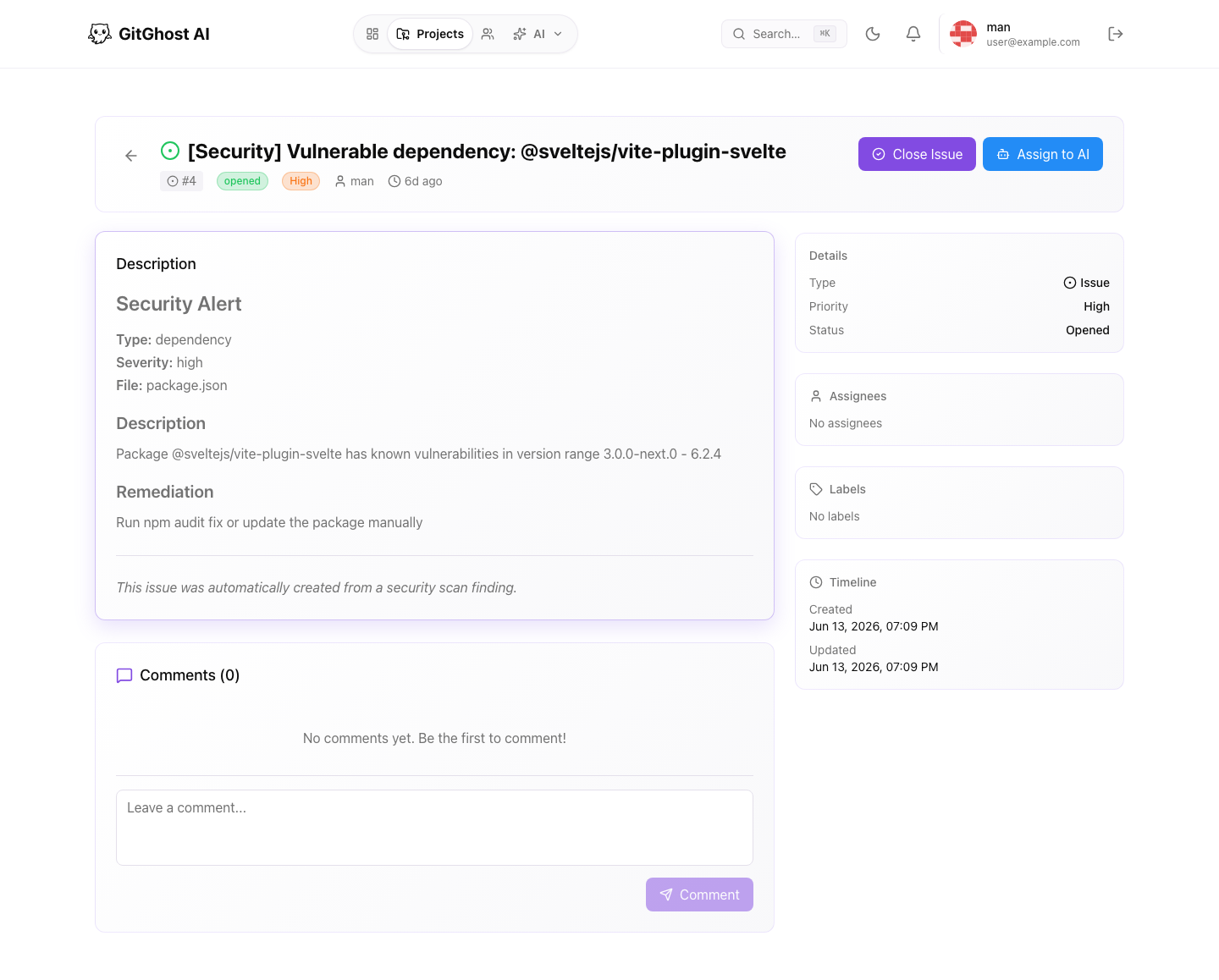
Issue Detail Layout
The issue detail page shows:
- Title, issue number, status, priority, and type.
- Description rendered with Markdown.
- Comments and system notes.
- Assignees and labels.
- Creation, update, and close timestamps.
- AI activity when an issue is assigned to AI or has AI evidence.
Use the right-side details panel to understand ownership and triage. Use the main conversation to preserve decisions.
Comments
Add comments for review questions, reproduction notes, acceptance criteria, and follow-up decisions. Do not paste secrets, customer data, tokens, private logs, or credentials.
Good comments answer:
- What changed since the issue was opened?
- What should the assignee do next?
- What evidence will prove the issue is complete?
- Which merge request, pipeline, or security alert is related?
Close And Reopen
Close an issue when the work is complete, duplicated elsewhere, or no longer needed. Reopen it when new evidence shows the problem still exists.
Closing an issue does not automatically prove the code is merged. For code work, verify the linked merge request and validation results.
Assign To AI
Use Assign to AI when the issue has enough context for an AI agent to start safely.
Before assigning:
- Write the expected outcome.
- Include reproduction steps or acceptance criteria.
- Link relevant files, branches, or alerts.
- State constraints such as "do not change public API" or "only update docs."
- Confirm the project Agent Policy allows the type of work.
When an issue is assigned to AI, Gitghost AI can show an AI activity timeline with related jobs, plans, approvals, merge requests, pipelines, and security scans.
Security-Created Issues
Security findings can create issues that already include alert context, affected package or file, and remediation guidance. Treat these issues as work items, but still validate the fix through a merge request and pipeline.
For security issues:
- Confirm the severity and affected component.
- Check whether a fixed version exists.
- Decide whether the fix is urgent, scheduled, accepted risk, or false positive.
- Keep the remediation decision visible in the issue or linked security alert.
Good AI Handoff Template
Use this structure when you want a person or AI agent to pick up work quickly:
Goal:
Context:
Files or areas to inspect:
Constraints:
Validation required:
Expected output: