Developer OAuth Apps
Developer OAuth apps let your own tools request user-approved access to Gitghost AI. Use them for editors, bots, browser extensions, internal dashboards, and automation that should act with an explicit user consent trail.
When To Use OAuth
Use OAuth when an integration needs access on behalf of a Gitghost AI user.
Good OAuth use cases:
- A code editor extension reading repository metadata.
- A team dashboard reading issue and pipeline status.
- A bot creating comments after user authorization.
- A browser integration linking Gitghost AI context into another tool.
Use outbound project webhooks when Gitghost AI should notify another service about pushes, tags, or merge request activity. Use the inbound pipeline trigger URL only when an external Git provider needs to notify Gitghost AI. Use project access tokens for Git operations. Use personal tokens only for simple scripts where OAuth is not appropriate.
Create An Application
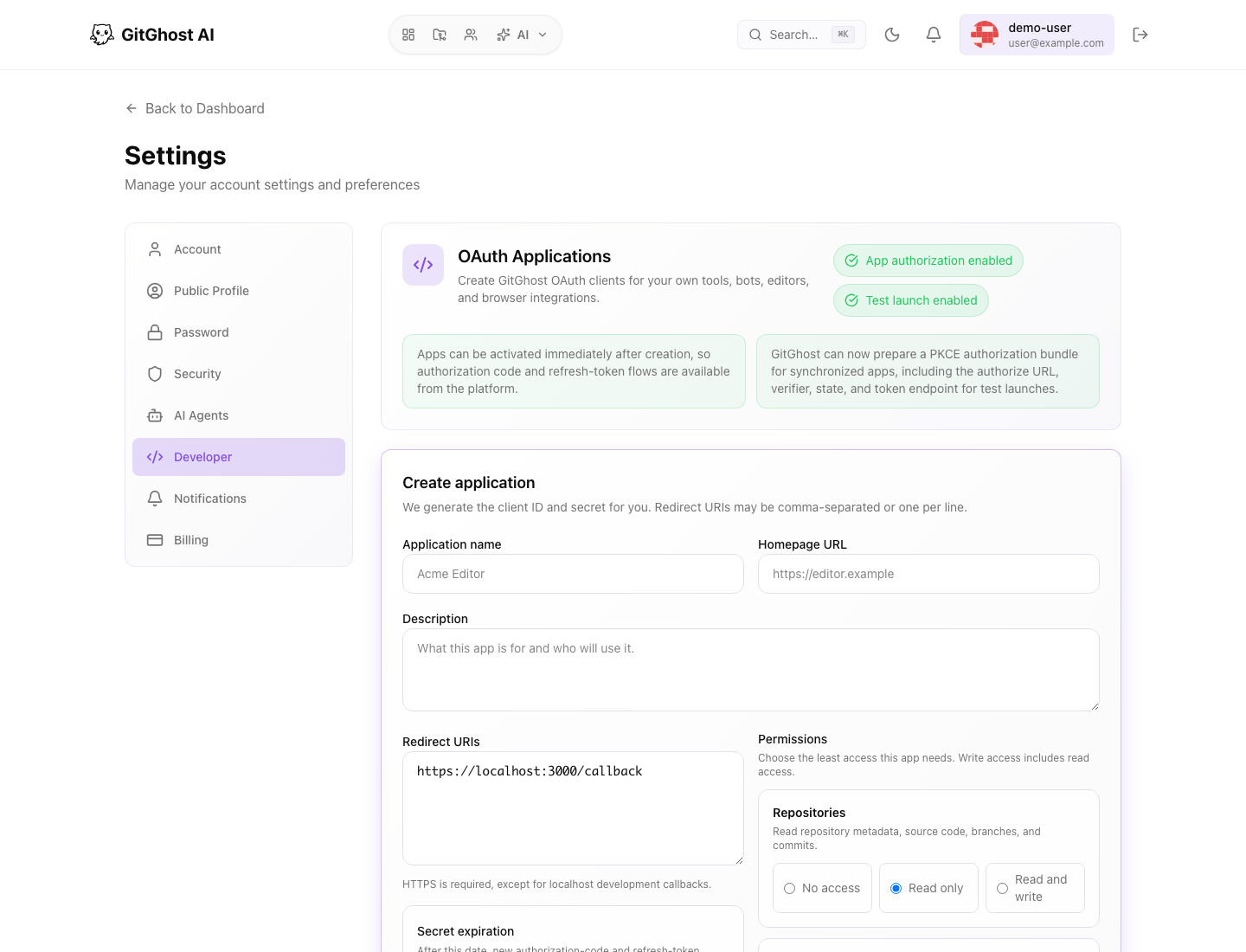
When creating an app, provide:
- A recognizable name.
- Optional description.
- Homepage URL when users need to identify the app.
- One or more redirect URIs.
- Least-privilege permissions.
- Optional client secret expiration.
Gitghost AI shows the full client secret only once. Store it immediately in the application configuration or an approved secret manager.
Redirect URIs
Redirect URIs define where Gitghost AI may return users after authorization.
Rules:
- Use HTTPS for deployed apps.
- Use local callback URLs only for local development.
- Remove unused callbacks.
- Do not use wildcard redirects.
- Keep production and development app registrations separate when possible.
If authorization fails after consent, check that the exact redirect URI matches the one sent by the app.
Permissions
Choose the least access the app needs.
| Permission Area | Use For |
|---|---|
| Repositories | Reading metadata, source, branches, and commits. |
| Pipelines | Reading or starting pipeline-related workflows. |
| Issues | Reading or managing issues, labels, assignments, and comments. |
| AI features | Reading AI activity or requesting AI actions. |
| Activity | Reading audit and activity events for the signed-in user. |
Write access includes read access. Avoid write access unless the app truly needs to create or change Gitghost AI data.
Activation And Status
An app may show a draft, ready, failed, or revoked-like status depending on platform availability and synchronization state.
If an app is not ready:
- Review the app metadata.
- Confirm redirect URIs are valid.
- Activate or synchronize the app from developer settings when available.
- Read any visible error message.
- Ask a Gitghost AI admin if the environment has app authorization disabled.
PKCE Authorization Bundle
For supported apps, Gitghost AI can prepare a PKCE authorization bundle for testing. A bundle can include an authorization URL, state, code verifier, challenge, and token endpoint details.
Use the bundle to test the authorization flow. Do not publish the code verifier, state, client secret, or token response.
Rotate Or Expire Secrets
Rotate a client secret when:
- A developer leaves the project.
- A secret may have been exposed.
- The app changed owners.
- Rotation is part of your regular security schedule.
Set an expiration when the app does not need a permanent secret. After rotation, update the integration immediately because the old secret should stop working.
Revoke Or Delete Apps
Delete apps that are unused or unsafe. Users can also revoke authorized apps from account security settings.
Before deleting:
- Confirm no active workflow still depends on the app.
- Notify the app owner.
- Remove the secret from the external app configuration.
- Review logs or activity for unexpected use if the app was suspicious.